

Imagine this. You come home after a long day, arms full of groceries, kids arguing behind you, and it starts to rain. You tap your smart lock to open the door. Nothing. The battery is dead.
In that moment, the type of smart lock on your door really matters.
Some smart locks give you a backup keyhole so you can still get inside. Those are called mechanical override smart locks. Others are fully digital and have no key at all. Those are digital only smart locks.
In this guide, we will walk through both types in simple language. You will see how they work, where they shine, where they struggle, and how to choose the right one for your home, rental, or office.
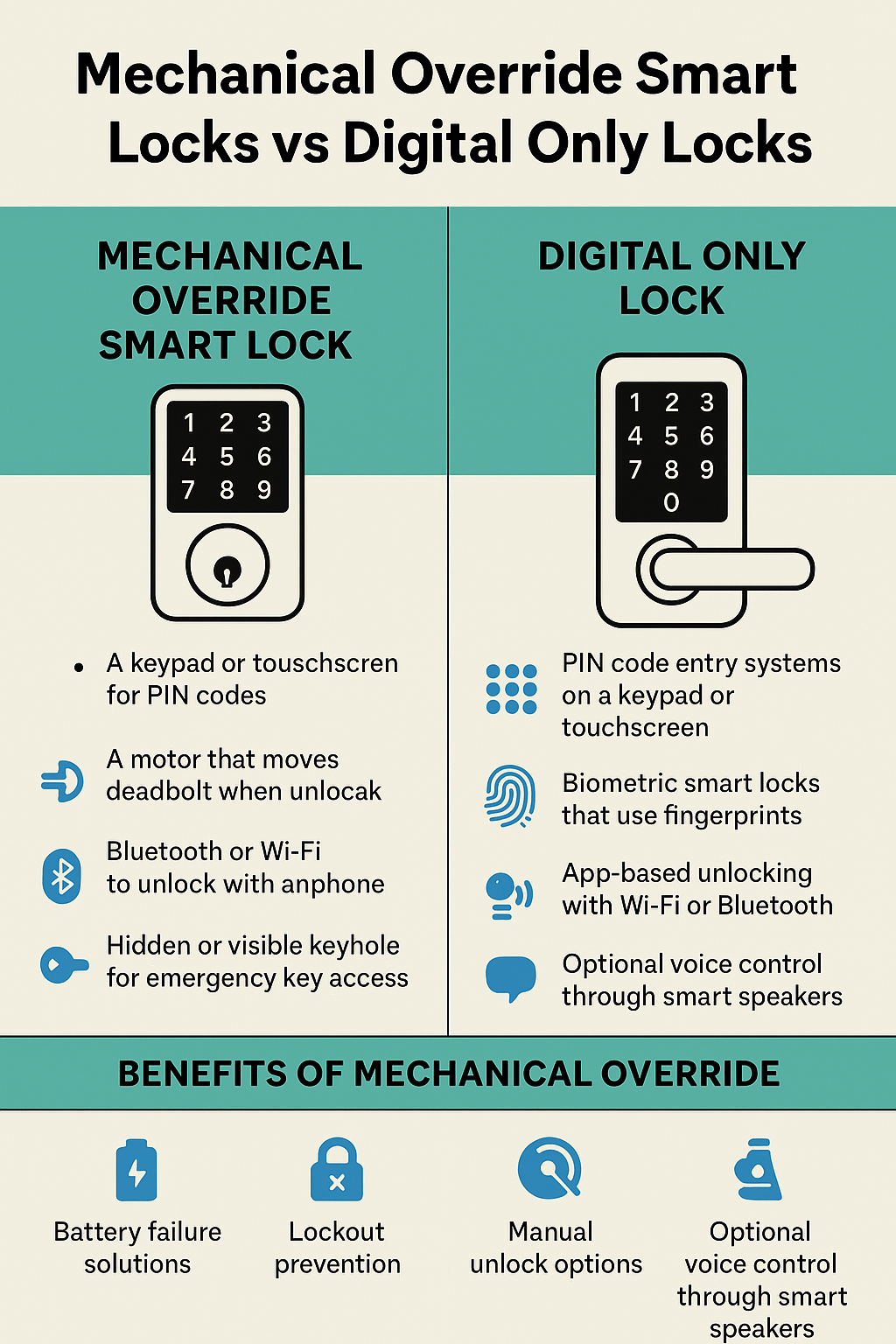
What Is a Mechanical Override Smart Lock
A mechanical override smart lock is a smart lock with a backup physical key. Think of it like a high tech lock wearing an old school key as a safety belt.
Most of these locks include
- A keypad or touchscreen for PIN codes
- A motor that moves the deadbolt when you unlock it
- Bluetooth or WiFi so you can unlock with your phone
- A hidden or visible keyhole for emergency key access
Benefits of Mechanical Override
The big plus is peace of mind. If the digital side ever fails, you still have a metal key. That means
- Battery failure solutions
If the battery dies, you simply use the key and change the batteries once you are inside. - Lockout prevention
You are less likely to be stuck outside at night with no way in. - Manual unlock options
If the app glitches or your phone breaks, the key still works.
This backup path is called mechanical bypass safety. It is like having a spare tire in your car. You hope you never need it, but you are glad it is there.
Mechanical Override Installation and Maintenance
Mechanical override installation is usually similar to installing a normal deadbolt. Many models are designed for standard doors, which helps with door compatibility.
You still need to
- Follow the mechanical override installation guide
- Make sure the deadbolt lines up correctly with the strike plate
- Test both the smart features and the key multiple times
For mechanical override maintenance
- Keep the keyhole clean and free from dust
- Use a dry lubricant once or twice a year
- Store spare keys in a safe spot away from the door
Mechanical key maintenance sounds boring, but it keeps that backup path ready when life goes sideways.
What Is a Digital Only Smart Lock
Digital only smart locks are fully keyless. There is no keyhole at all. Everything is electronic.
They often include
- PIN code entry systems on a keypad or touchscreen
- Biometric smart locks that use fingerprints
- App based unlocking with WiFi or Bluetooth
- Optional voice control through smart speakers
Digital Only Lock Features
Digital only smart locks are designed for speed and convenience.
Common features
- Auto lock after a set time
- Temporary codes for guests
- Remote unlocking from your phone
- Activity logs that show who unlocked and when
These locks work best when you have stable power and good connectivity. Many people love them because they feel futuristic and clean.
Digital Only Lock Risks and Power Issues
Without a keyhole, you fully depend on electronics. That creates some risks.
Digital only lock security risks include
- Hacking risks in digital locks
- Weak or reused PIN codes
- Poor app passwords
Digital only lock power issues
- If batteries die and there is no backup power, you are locked out until you replace them from outside
- If the lock relies on WiFi and your network is down, some features might not work
Many brands offer emergency power pads where you can touch a 9V battery to the lock to wake it up once. Still, you must be honest with yourself. Are you the kind of person who waits until your phone is at 1 percent every day? If yes, you might struggle with a lock that has no backup key.
Security Comparison: Mechanical vs Digital
So which option is safer? The answer is not one simple word. It depends on the type of risk you worry about.
Physical Break In Risks
Both lock types still use a physical deadbolt. That means
- If your door frame is weak, a strong kick might still break it
- If someone has a lot of time, they might try to pick the lock or drill it
Good smart locks often have better tamper resistance compared to cheap deadbolts. Look for models that are rated for high security and have hardened metal parts.
Hacking Risks in Digital Locks
Digital only smart locks rely more on apps, WiFi, and Bluetooth. That means
- You must use strong passwords
- You should enable two factor authentication if the brand offers it
- You need to install digital firmware updates to fix bugs and security issues
Mechanical override smart locks can be hacked too if they connect to the internet, but they have redundancy and fail safe options. If the digital part ever gets confused, you can fall back to the key.
Reliability in Everyday Life
Security is one thing. Daily reliability is another. You want the lock that works smoothly on a normal Tuesday when kids are late for school, your hands are full, and your phone battery is low.
Power Failure Performance
Mechanical override smart locks
- Work digitally as long as batteries are fine
- Still open with a key during a power failure
Digital only smart locks
- Often rely fully on batteries or wired power
- Might require emergency power tricks if batteries die
If you live in an area with frequent power cuts, mechanical fail safes vs software reliability become a big deal.
Connectivity Dependence and Weather
Many digital only smart locks rely heavily on WiFi and Bluetooth. If your network is unstable, features like remote unlock may lag or fail.
Weather impact on lock types also matters
- In very cold or hot weather, electronics and batteries can struggle
- Outdoor locks should be rated for your climate
- Weatherproof covers can help protect keypads and keyholes
Mechanical override smart locks still have electronics, but the key gives you a backup when the weather is not friendly.
User Experience: Who Will Use the Lock
Do not just think about yourself. Think about everyone who needs access.
Ease of Use for Seniors and Kids
For seniors
- Clear buttons and simple PIN codes are easier than complex apps
- A physical key can feel familiar and safe
For kids
- A PIN code is often easier than keeping a key safe
- You can give them a simple code and change it later if needed
Mechanical override smart locks are great when you want both options.
Guest Access and Multi User Control
Features to look for
- Multi user access for family members
- Guest access controls for visitors
- One time codes for cleaners or repair workers
Both lock types can offer these, but digital only smart locks lean heavily on app based control. If you manage a busy home or rental, that can be very powerful.
Installation, Maintenance, and Troubleshooting
Smart locks are not just a one time purchase. They need a bit of care to stay healthy.
Installation and Setup
You will see two paths
- Professional installation if you are not handy
- DIY setup if you like tools and can follow instructions
For both mechanical override and digital only smart locks, check
- Door compatibility with your thickness and backset
- Clear instructions for digital lock setup requirements
- Correct alignment so the deadbolt slides smoothly
Maintenance and Troubleshooting
Plan for
- Battery replacement tips
Change batteries before they die. Do not wait for warning beeps for weeks. - Digital firmware updates
Use the app to keep the lock updated and secure. - Error codes and diagnostics
Many smart locks show simple symbols or messages when something is wrong. Keep the manual handy or store the PDF on your phone.
For mechanical key maintenance
- Test the key once every few months
- Do not leave the keyhole exposed to heavy rain without protection
Use Cases: Which Lock Fits Your Life
Different spaces have different needs. Let us walk through a few.
Smart Locks for Apartments and Rentals
For apartments and smart locks for rentals
- Mechanical override smart locks work well because tenants get both a key and a code
- Landlords can change PIN codes between tenants without changing the whole lock
- Mechanical backup helps when tenants forget to change batteries
Smart Locks for Offices and High Security Homes
For smart locks for offices and high security homes
- Digital only smart locks with biometric smart locks and access logs can be powerful
- You can control access by employee, time, and door
- Integration with a home security system or office alarm system is often key
Here, strong digital access control plus regular updates and audits matter more than a backup key.
Smart Locks for Airbnb Hosts
Smart locks for Airbnb hosts need to be flexible.
Good features
- Guest access controls with timed codes
- Activity logs so you know when guests arrive
- Automation routines with smart locks, like turning on lights when the door unlocks
Many hosts like mechanical override smart locks because cleaners and owners still have a physical key, while guests use digital codes.
Smart Home Integrations and Automations
Both types of locks can often integrate with a wider smart home system.
Look for
- Smart home compatibility with platforms like Google Home or Apple Home
- Voice assistant integrations so you can check or lock the door with your voice
- Home security system pairing with cameras and door sensors
You can also create routines such as
- When the lock bolts, turn off lights and set the thermostat to away
- When the lock opens during certain hours, turn on entry lights
These smart home routines triggered by lock status make your home feel more alive and responsive.
Buying Guide: How to Choose Between Mechanical Override and Digital Only
When you stand in front of a wall of smart locks in a store, it can feel overwhelming. Here is a simple way to think it through.
Choose mechanical override smart locks if
- You worry about power cuts or dead batteries
- You want emergency key access as a backup
- You live with seniors or people who feel safer with a key
- You manage rentals and want both keys and codes
Choose digital only smart locks if
- You want a clean, modern look with no keyhole
- You trust yourself to keep up with battery replacement and updates
- You want advanced digital only lock features
- You love app control and do not mind being fully keyless
Also check
- Long term durability and weather rating
- Budget options that still have important security features
- Real user reviews for reliability and support
Think of it as choosing shoes. You do not just pick what looks coolest. You choose what fits your feet, your daily life, and your walk.
Final Thoughts
Your front door is more than wood and metal. It is the line between your safe space and the outside world. The smart lock you choose should match your life, your habits, and your comfort level.
If you value backup and safety nets, a mechanical override smart lock might be your best friend. If you love sleek tech and want to live fully key free, a digital only smart lock can feel amazing.
Now it is your turn.
Walk to your front door. Picture a busy day, a late night, or a family trip. Ask yourself
- Who needs access to this door
- How forgetful am I with batteries and passwords
- How much do I care about having a key backup
Once you know those answers, you are ready to choose the right smart lock with confidence. Do not just guess. Take the next step. Compare a few models, read a couple of trusted reviews, and make a choice that helps your home feel safer, smarter, and calmer every time you hear that lock click.